
Is this really necessary?
Alright, maybe twice. You got me... Maybe I have multiple different variations of the Cowboy Bebop sessions.
Nevertheless, I'd like to waffle a bit before getting to the main topic, but for the TL;DR, is it necessary to compress video? In my opinion, no.
The whole debate of X vs Y, usually boils down to- Does the medium have good value for money? Is it easily accessible? And on the note of value, what does it have for me that other services or physical media might not?
A great example of this is Tidal, being one of the few streaming exceptions -
I have much the same opinion for music as I do, video. I'd rather own it, plain and simple. Unlike video streaming services however, it actually can be in some cases a superior option. Sure, I have a copy of Voyage 34 on vinyl, which I could bypass all things digital, and bitrate becomes meaningless (Obviously, this is assuming I have a perfect pressing, and a multitude of other things that tick all the audiophile boxes).


Porcupine Tree's Voyage 34
That's where the easily accessible or convenience side of things comes in. Ripping a CD is much more convenient, than getting out a record every time I want to listen to the album, as I only have to do it once.
This is neither a for or against either medium, one is mildly inconvenient, but rather novel, and the FLAC versions of my CD's can sit on my storage server, accessible from anywhere.
BUT Tidal still wins out, at least in numbers when it comes to quality, price and convenience. With the exception of SACDs and Atmos Blu-ray mixes, standard CD's haven't made any generational improvements, still sitting at 16 bit / 44.1kHz.
Where as Tidal's 'Max' option (which isn't available for all tracks), but delivers a quite impressive 24bit / 192kHz. All that rambling to say, at least there's one streaming service that has value to add (If your goal is pure quality, and pending the tracks you want to listen to are actually on the service(s)).
With Tidal and a couple of other services being the exception to rule, where does it stand with video?
Well, if you're a quality snob, no one really does a good 4K option. They're highly compressed, and sure in some cases use modern codecs like AV1. But that doesn't make it good, it just makes it efficient, and more importantly cheaper for the streaming services.
Now with my preamble out of the way, this isn't necessarily aimed at budget friendly setups. We're going with the assumption that you want to reduce the amount of subscriptions you have, but you're old enough, stupid enough, and probably make enough money to make these decisions. One way or another.
Personally, I would argue, I probably buy too much physical media, but not in the realm of hoarding when it comes to movies, series, etc (If you combined it all, sure, it looks pretty bad, with the space that I have available, but let's assume you're a reasonable adult).
Due to the lack of good movies coming out in recent years my UHD collection has definitely fallen off. Currently I'm sitting at 135 UHD movies ripped and sitting on my storage server. Which only consumes 7TB of space.
That might sound like a lot, but you can get a 22TB drive for about $650-700 AUD. Accounting for usable space, a drive that is completely full holds about 400 UHD movies.
And that's assuming everything you pick is available in 4K, where the average file size is 50GB per movie (admittedly getting larger as the years go on, example below).
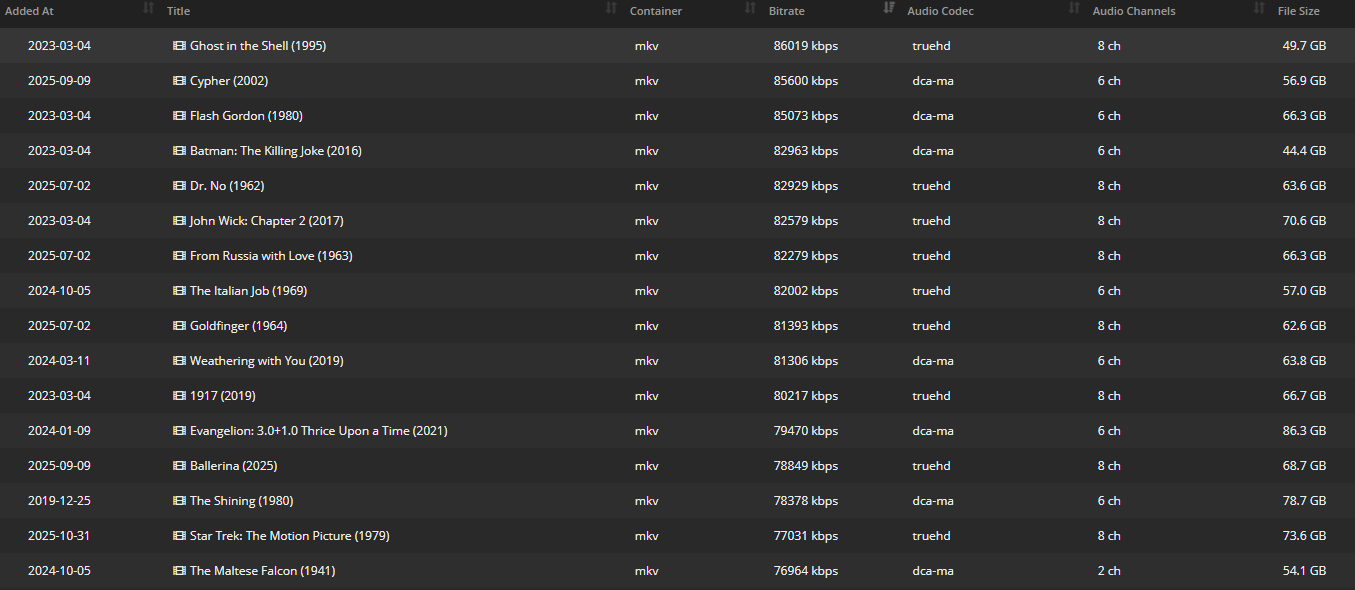
Regular 1080p blu-ray's are about half the size the majority of the time, which is ~800 movies raw, that's a lot of movies. Sure, it's not a Netflix library, but if we just wanted a collection of movies that are your forever movies, in the best quality possible. We could presumably minimise your subscriptions. It's definitely not the worst option.
Most people probably assume the issues with this might be the compute power, the giant network rack you might need. But you have to remember, these are discs. They need to be the most compatible formats, and be playable from said disc.
If you have a modem / router from this decade and a computer with an ethernet port, you're in pretty good shape. As I showed in the image above, the worst offending file is Ghost in the Shell (1995) at 86mbps.
86mbps might sound like a lot for when compared to your average internet connection (Understandbly not everyone has an overkill internet connection). If you have a WiFi 6 capable router, even an average local connection is around 300mbps, and that's to a single device. That's over 3 times more bandwidth than required for my worst case scenario, and I only have 10 movies that sit in that category.
That vaguely covers network speed, but what about the required hardware? Well, as I mentioned with the 22TB hard drive, reiterating that I said hard drive. A modern spinning rust drive can pretty comfortably move 150-200MB/s, that's 2gbps (2000mbps!). Which is faster than the ethernet jack on the old computer you haven't thrown out yet, that you're going to plug the hard drive into.
Then the reason for a lossless rip itself, it's purpose is usually for compatibility. For example, if I do highly compressed AV1 with an out of the norm audio codec, there's a good chance my old TV isn't going to be able to stream it. In which case I need a beefier computer that can handle the transcoding, especially if we're talking about HDR or Dolby Vision content.
The idea is to have direct playback, whether it be Jellyfin, Plex or whatever your preferred service is. The less transcoding we have to do, the better off we are.
There's definitely some draw backs to this. If I do happen to have a giant collection, it's going to be an ongoing cost, and could defeat the purpose of minimising your subscription cost. If you just want to digitise your current collection, which happens to be a mix of everything from DVD to UHD, you're probably in a good place to start. Regardless some of the drawbacks include the following -
- It can be very time consuming, but there's plenty of tools to help speed up the process.
- A single drive solution is never going to be safe, but you also have physical copies. Do with that what you will.
- UHD discs require a bit more screwing around to rip and require specific drives, but if you found this, you can find a guide or list — likely on the MakeMKV forums.
- If your network setup is budget orientated, and you've gone for purely 4K. Your home network will likely be a huge bottleneck, particularly if you have a decent amount of users utilising your library. This is even more prevalent if you want to share remotely — you need quite a bit of overhead.
- Yes, movies cost money! But you can gamble and buy them second hand. Then they're yours to keep or sell off again.
Hardware Haven has plenty of examples of streaming from older, some times underpowered and 'outdated' computers, that kind of proves my point that the hardware doesn't need to be over the top, especially when the point is to not use the compute side of the hardware, just making it accessible and easy to consume.
Do I think all content should be uncompressed? Absolutely not, there's definitely use cases where ripping discs and doing nothing is disadvantageous.
Sure, most of my reasons for using something like Handbrake could easily be rectified with ffmpeg and some scripts. But that borders the line of- is this convenient anymore?
Heres some cases where I'd absolutely prefer to process the content, whether it be compressed or converted -
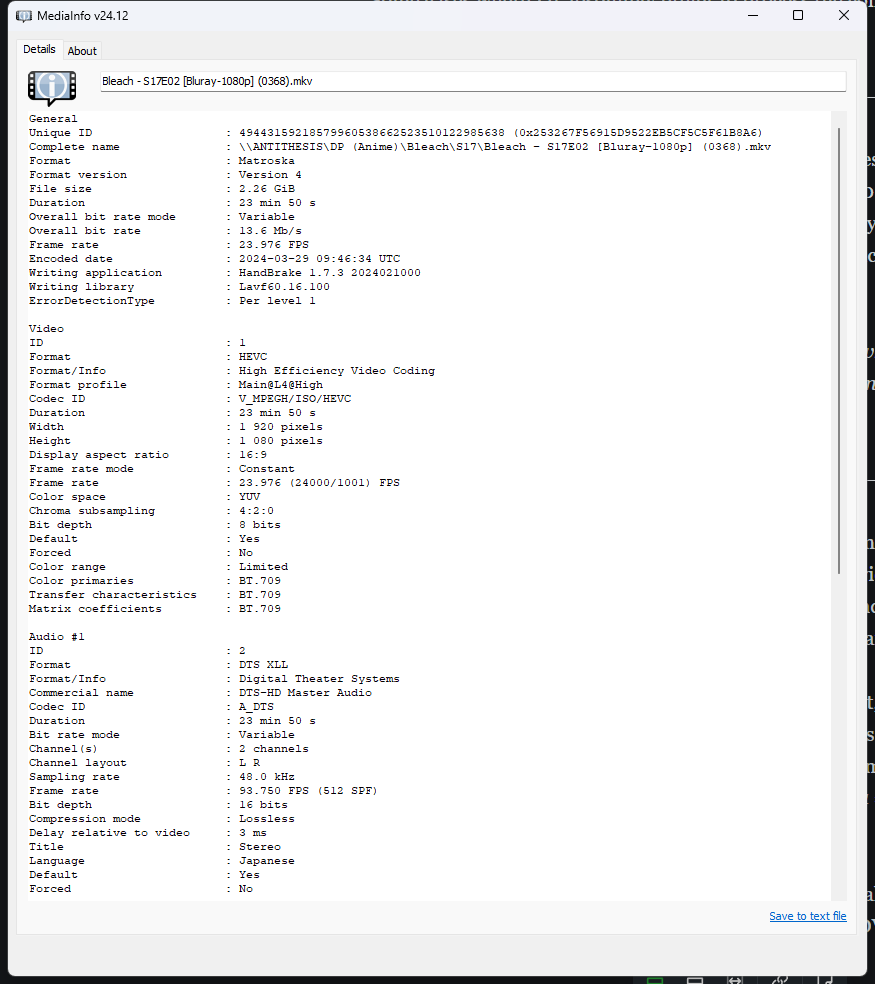
Anime - I've found series where I have multiple volumes, ie; Bleach, always seem to come in one contiguous file. If you feel like binging 300+ episodes back to back, good for you. I don't have that kind of attention span anymore.
As such I will take it into Handbrake, queue up splits between episodes, encode in H265 at 15-20mbps, whilst passing through the audio tracks untouched.
Compression enthusiasts would probably be digusted when I mention I use the NVenc encoders, because I don't particularly want to encode episodes over multiple days.
DVD Content - Particularly older DVD's, and even some modern ones tend to use interlacing. In my experience, most local streaming services won't handle this or at least handle it well. Which can lead to a subpar experience especially in high motion scenes where the interlacing will be most prominent.
The solution I came across years ago and have stuck to may not be the correct or best solution, but it does seem to work.
- Take the files into Handbrake.
- Ensure Decomb is on — not Deinterlace.
- Make sure your preset matches the frame rate of the original video.
For interlaced media, that's half — for example, 59.94 → 29.97. - Set the frame rate to constant.
- For bitrate, I tend to match the typical highest quality you can get from a DVD — around 9 Mbps.
This isn't true for all DVDs, but it's a safe bet and even overkill, especially when using H265 or AV1 codecs.
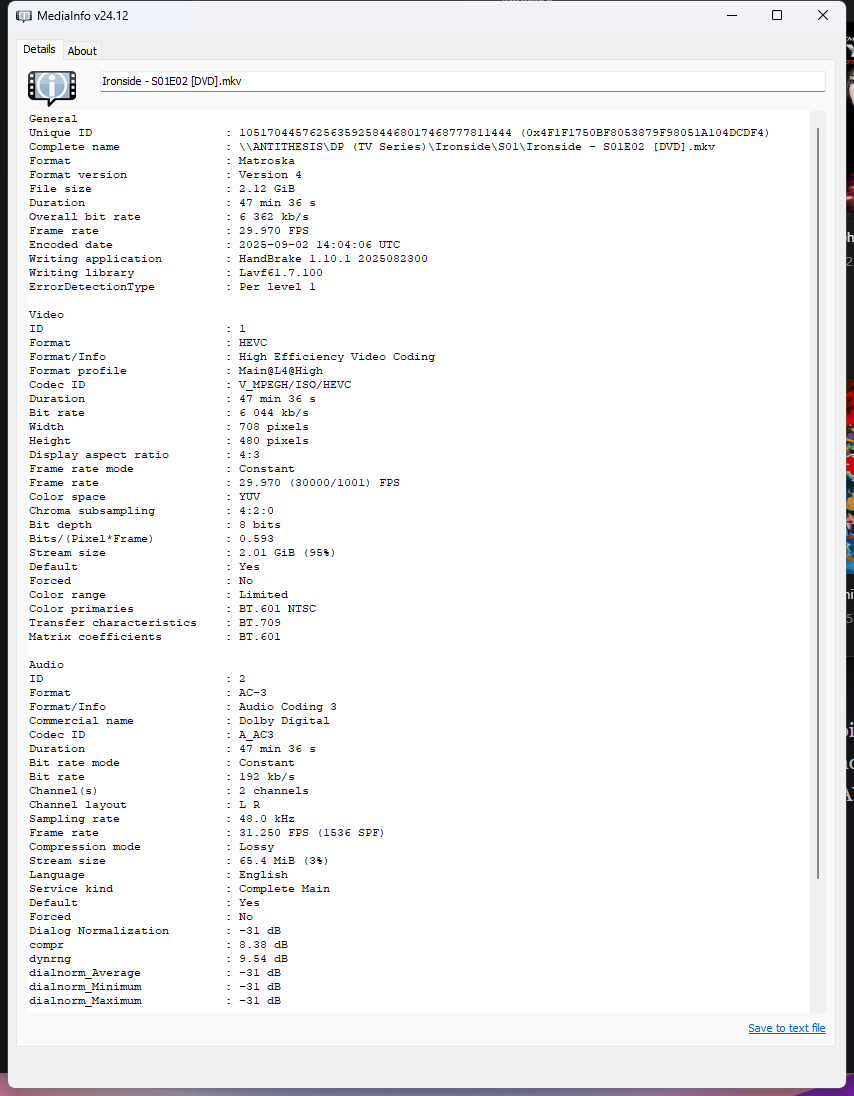
I try to keep a log of movies that I own, this has a fair chunk of my collection, with their format and respective size on disk.

Member discussion